SimpleCAD
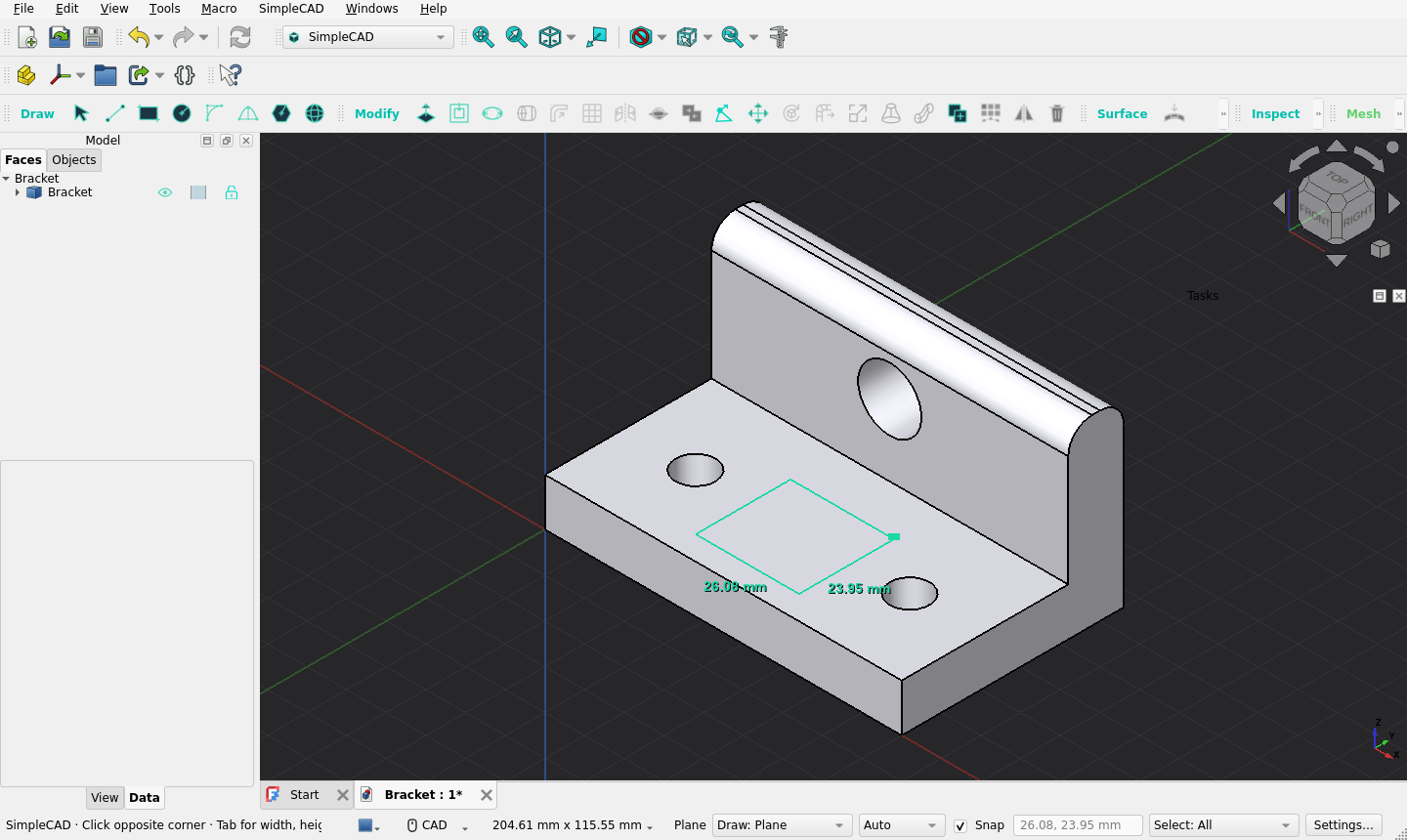
Direct modeling for FreeCAD, in the spirit of SketchUp. Draw a shape, pull it into a solid, then keep editing its faces and edges directly. There are no sketches, constraints or feature tree to manage, and imported STL meshes can be edited as they are.


Features
- Draw and pull. Line, Rectangle, Circle, Arc, Polygon and Sphere. Lines
and outlines can also be drawn directly on curved faces. Push/Pull turns any
flat region into a boss, a pocket or a through-hole. Type exact sizes with
units (
40, 30,2 cm,1 in) at any point while drawing. - Edit any shape. Divide faces with lines, then offset, round, slice, union, intersect, bend, scale, loft, sweep, mirror or pattern them. This works on any plain Part shape, including converted STL meshes.
- Curved surfaces. Draw on curved faces, offset them, shell or thicken a part, add draft, remove fillets, fill holes, unwrap a face, and show a curvature map.
- STL meshes without conversion. Split a mesh with an optional glue seam, stretch it between two planes, or move, rotate and extrude a patch of triangles. When you need CAD faces, Make mesh editable fits planes, cylinders and smooth surfaces.
- Snapping and measuring. Snap to endpoints, midpoints, face and hole centers and the X/Y/Z axes. Measure hole diameters, spacing, distances and angles, and leave dimensions in the view.
- Plain FreeCAD files. Results are ordinary Part and Mesh objects in
.FCStddocuments that open without SimpleCAD installed. Every edit is one Undo step. - AI-ready. A local MCP server lets AI clients such as Claude or Codex inspect and edit the open model with the same operations as the toolbar.
https://github.com/user-attachments/assets/3ee6a401-5bb9-443b-8c6b-4076e62b04a1
Requirements
- FreeCAD 1.1 or later. SimpleCAD is developed with FreeCAD 1.1.3.
- Nothing else to install: FreeCAD's own installers include Python,
OpenCascade, Qt, Coin, NumPy and SciPy. A FreeCAD from a Linux distribution
package may need its
numpyandscipyPython packages installed too. - Developed and used on macOS. The automated tests also run on Linux. Windows has not been tested yet; reports are welcome.
Install
Addon Manager
- In FreeCAD, open Edit → Preferences → Addon Manager.
- Under Custom repositories, add
https://github.com/igsova/SimpleCADwith branchmain. - Open Tools → Addon manager, find SimpleCAD and install it.
- Restart FreeCAD and choose SimpleCAD in the workbench selector.
Manual
Clone or unzip the repository into FreeCAD's Mod folder, so that
InitGui.py sits directly inside Mod/SimpleCAD:
git clone https://github.com/igsova/SimpleCAD.git "<Mod folder>/SimpleCAD"
To find the Mod folder, open View → Panels → Python console in FreeCAD
and run App.getUserAppDataDir(); Mod is inside the folder it prints.
For FreeCAD 1.1 it is usually:
| System | Mod folder |
|---|---|
| macOS | ~/Library/Application Support/FreeCAD/v1-1/Mod |
| Linux | ~/.local/share/FreeCAD/v1-1/Mod |
| Windows | %APPDATA%\FreeCAD\v1-1\Mod |
On macOS, python3 scripts/install_macos.py from a clone asks FreeCAD for this
folder and links the clone there. Add --copy for an independent copy, or
--uninstall to remove the link.
Quick start
- Choose SimpleCAD and click Rectangle (or press R with the 3D
view focused). Click a corner, press Tab, type
40, 30and press Enter. - Press P (Push/Pull), click the rectangle, press Tab, type
20and press Enter. You now have a 40 × 30 × 20 mm block. - Press L (Line), click the midpoint of one top edge, then the midpoint of the opposite edge. The top face is now two regions. Press P and pull one of them up.
- Press O (Circle), click on the lower region for the center, type
5for the radius and press Enter. Press P and drag the circle down until the status bar says On opposite face, then release to make a through-hole. - Esc cancels the current step, and ⌘Z or Ctrl+Z undoes the last edit.
The user guide covers every tool.
Tools
| Group | Tools |
|---|---|
| Draw | Select, Line, Rectangle, Circle, Arc, 2 Point Arc, Polygon, Sphere |
| Modify | Push/Pull, Offset, Elongate, Fit Circle / Cylinder, Round edges, Subdivide face, Slice / Separate (with printable stud joints), Intersect Faces, Union, Move Vertex, Move, Rotate, Bend / Soft Deform, Scale / Stretch, Loft, Sweep, Copy, Pattern, Mirror, Delete, Color & opacity, Merge coincident geometry, Heal to precision |
| Surface | Draw on surface, Offset face, Shell / Thicken, Draft faces, Delete & heal faces, Remove rounds, Fill hole, Unwrap face |
| Inspect | Smart select, Measure, Curvature map, Isolate selection |
| Mesh | Make mesh editable, Split mesh, Stretch mesh, Mesh region (Move / Rotate / Extrude) |
Single-letter shortcuts work while the 3D view has focus; see the tool reference.
Limitations
- Tools edit plain Part shapes. For a parametric Part or PartDesign feature, make a Part → Create a copy → Create simple copy first.
- Push/Pull works on flat faces; use Offset face for curved ones.
- SimpleCAD is young and changes quickly. The fit of printed stud joints and glue seams has not been tested on a printer.
See the roadmap for planned work and the changelog for what changed.
Development
simplecad/
  core/         geometry helpers, coincidence, preferences
  modeling/     Part algorithms behind the Draw and Modify tools
  surfaces/     drawing on and editing curved faces
  mesh/         raw STL editing and mesh-to-CAD conversion
  repair/       Heal to precision
  inspection/   Measure and smart selection
  document/     undoable document writes, materials, locks, visibility
  jobs/         background worker processes
  mcp/          the local MCP server and bridge
  gui/          workbench, commands, controller, previews and tool panels
scripts/        workers, MCP server, installer and test runners
tests/          unit/, gui/ and benchmarks/
Run the unit tests with FreeCAD's own Python:
sh scripts/test_macos.sh                    # macOS, using /Applications/FreeCAD.app
PYTHONPATH=.:<FreeCAD>/lib <FreeCAD>/bin/python -m unittest discover -s tests/unit
GUI suites run inside a FreeCAD window, one process per suite (with xvfb-run
on a headless Linux machine):
sh scripts/test_gui.sh gui_smoke gui_mesh_region # or no names for all suites
Read CONTRIBUTING.md before opening a pull request. The architecture notes describe the design in depth.
License
MIT.